Modern real estate buyers and tenants prioritize integrated home security systems essential features when selecting a home. Installing effective security assets increases tenant retention, lowers insurance premiums, and boosts market value.
Protect your property, improve everyday safety, and make informed real estate decisions with the right home security technology.
Homeowners, property buyers, and real estate sellers need reliable protection without paying for unnecessary technology. The solution is to prioritize Home Security Systems Essential Features such as door and window sensors, security cameras, smart locks, intrusion alarms, reliable monitoring, and backup power.
In real estate markets, the best system is one that fits the property’s layout, is easy to maintain, protects occupants’ privacy, and can be transferred securely to a new owner. Sellers can use these features to demonstrate practical benefits, while buyers can inspect installation quality, subscriptions, compatibility, and ownership rights before making an offer.
Key Elements of a Modern Security Setup
- Smart Access Control: Keyless entry deadbolts and video doorbells provide convenient remote monitoring and activity logs.
- 24/7 Perimeter Surveillance: HD exterior cameras equipped with motion detection, night vision, and cloud storage serve as an active deterrent to property crimes.
- Monitored Environmental Sensors: Smart smoke, carbon monoxide, and water leak detectors immediately alert owners to environmental hazards, preventing severe damage before it escalates.
- Integrated Lighting Automation: Motion-activated floodlights around entryways and schedule-driven interior lights give the property a lived-in appearance during vacancies.
What Are Home Security Systems Essential Features?
Home security systems essential features are the hardware, software, monitoring services, and backup mechanisms that work together to reduce security risks and help occupants respond to emergencies.
Traditional systems often rely on physical locks and audible alarms. Modern residential security systems can combine cameras, connected sensors, smartphone notifications, remote access, and professional monitoring in one coordinated setup.
In real estate, the distinction matters. A home may advertise smart technology, but buyers need to know whether the devices work reliably, whether the service requires a subscription, and whether the equipment will remain useful after the sale.
A good system should deliver three outcomes:
- Protection: Detect suspicious activity and discourage unauthorized entry.
- Usability: Let residents understand alerts, manage access, and respond appropriately.
- Long-term reliability: Remain maintainable, secure, and compatible with the property’s needs.
15 Home Security Systems Essential Features
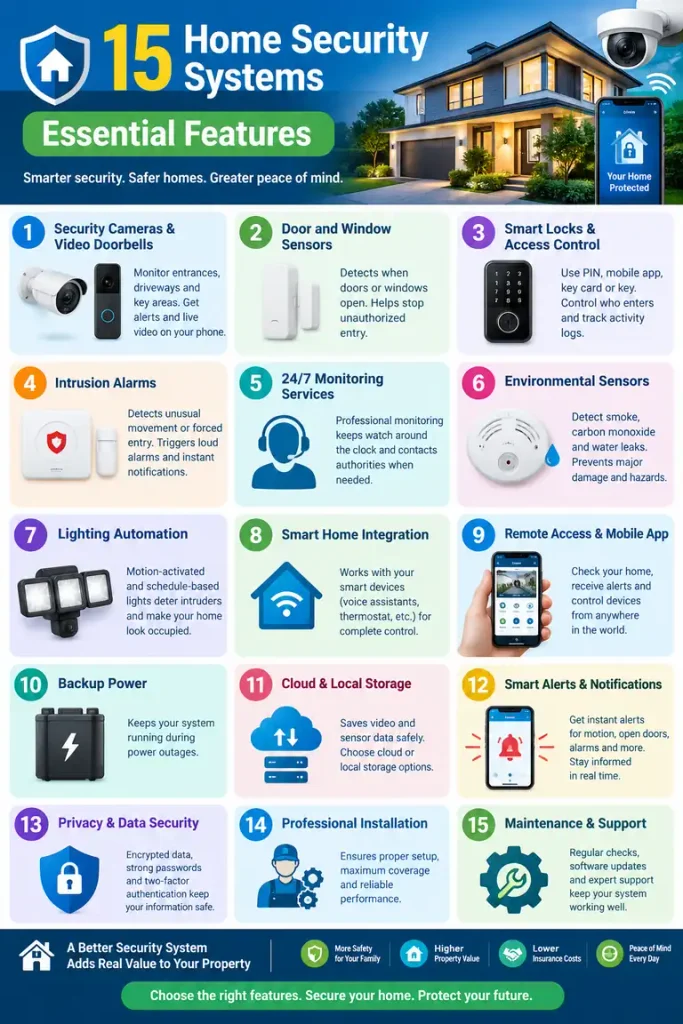
1. Security Cameras and Video Doorbells
Security cameras provide visual information about activity around entrances, driveways, garages, and other suitable locations. Video doorbells can show who is at the front door and, depending on the model, record motion or provide two-way communication.
Look for these features when comparing equipment:
- Clear daytime and nighttime footage.
- Motion detection with adjustable sensitivity.
- Secure video storage, whether local or cloud-based.
- Remote viewing through an authenticated application.
- A field of view that covers important entrances without unnecessary intrusion into private areas.
- Notifications that distinguish useful events from repeated false alarms.
Real Estate Example: A seller listing a detached house could demonstrate an exterior camera covering the driveway and a video doorbell at the main entrance. This helps prospective buyers understand the property’s existing security setup without claiming that cameras eliminate burglary risk.
Buyers should check whether cameras are included in the sale, whether recordings require a paid plan, and whether the devices can operate independently of the seller’s account.
The US Federal Trade Commission recommends securing camera accounts, using strong unique passwords, enabling two-factor authentication when available, updating software, and reviewing encryption and network settings.
2. Door and Window Sensors
Entry sensors detect when a protected door or window opens. They are among the most practical components of an intrusion detection system because they help identify activity at potential entry points.
Prioritize sensors for:
- Main entrance doors.
- Rear and side doors.
- Accessible ground-floor windows.
- Garage doors and connecting doors.
- Other vulnerable entrances identified during a property assessment.
Sensors should communicate reliably with the alarm hub and generate notifications appropriate to the household’s routine.
Example: A family buying a house with several ground-floor windows can ask the installer to assess every accessible opening rather than relying on a single front-door sensor. This creates a more complete coverage plan.
In apartment buildings, buyers should also consider shared entrances, building access controls, and restrictions on installing equipment in common areas.
3. Smart Locks and Access Control
Smart locks can allow residents to enter using a PIN, mobile application, compatible credential, or physical key, depending on the model.
Useful capabilities include:
- Temporary codes for authorized visitors.
- Individual access permissions.
- Automatic locking, if appropriate for the door and household.
- Entry history where available.
- Low-battery warnings.
- A dependable backup entry method.
Smart locks can be particularly useful in rental properties, serviced apartments, and homes with regular maintenance visits.
Real Estate Example: A property manager can issue a temporary access code to an authorized contractor instead of distributing a permanent household key. Once the work is complete, the code can be revoked.
However, smart locks introduce an important ownership issue. Sellers should remove their personal accounts and access permissions, while buyers should establish their own administrator account and replace or reset codes after completion.
Check the lock’s compatibility with the door, its emergency entry procedure, battery life, and any subscription requirements before purchasing.
4. Intrusion Alarms and Professional Monitoring
An intrusion alarm uses sensors to detect specified events and may activate a siren or send alerts to designated contacts. Some systems also connect to a professional monitoring center.
Self-monitoring and professional monitoring serve different needs.
| Consideration | Self-monitoring | Professional monitoring |
|---|---|---|
| Alert handling | The owner receives and responds to notifications | A monitoring center handles qualifying signals |
| Ongoing cost | May be free or subscription-based | Usually involves a service fee |
| Dependence | Relies on someone being available to respond | Adds an external response process |
| Best suited to | Owners comfortable managing alerts | Households wanting additional support |
| Important limitation | Alerts may be missed or delayed | Dispatch procedures, availability, and coverage vary |
Before choosing a service, ask how alarms are verified, what happens when the internet fails, whether cellular communication is available, and what fees apply to emergency dispatch or false alarms.
Professional monitoring should not be described as a guarantee that police, fire services, or emergency personnel will arrive within a specific time. Response depends on the service arrangement and local circumstances.
For real estate buyers, request the monitoring contract and establish whether it can be transferred, canceled, or replaced without additional charges.
5. Motion Detection and Outdoor Lighting
Motion detectors identify movement within a defined area. When integrated with compatible lighting, cameras, or alarms, they can help residents identify activity and illuminate dark approaches.
A practical installation may combine:
- Outdoor lighting at entrances and pathways.
- Motion sensors covering suitable approach areas.
- Camera coverage of important external zones.
- Adjustable sensitivity to reduce nuisance alerts.
- Weather-resistant equipment where exposed to the elements.
Example: A house with a side passage and detached garage may benefit from motion-activated lighting and a camera positioned to cover the approach. The objective is to improve visibility while avoiding unnecessary recording of neighbors’ windows or private outdoor spaces.
Lighting alone is not a complete security system. It should complement physical locks, entry sensors, and an appropriate alarm arrangement.
6. Reliable Connectivity and Backup Power
Smart security equipment can lose some or all of its functionality during an internet outage or power interruption. Buyers should understand what continues to work when infrastructure fails.
Important considerations include:
- Battery backup for the alarm hub and supported devices.
- Cellular communication where appropriate and available.
- Local recording if internet access is interrupted.
- Router and network backup for equipment that depends on Wi-Fi.
- Clear low-battery and connection-loss notifications.
- Documented recovery procedures after an outage.
Real Estate Example: In a Pakistani home affected by load-shedding, a buyer might ask whether the alarm hub, router, and cameras have suitable backup power. A camera connected to a router that shuts down during an outage may not provide the expected remote access.
The right solution depends on equipment power requirements, outage duration, network availability, and the cost of backup hardware. Buyers should ask an installer to test the complete system under realistic failure conditions.
7. Fire, Smoke, Carbon Monoxide, and Water-Leak Detection
Home protection extends beyond intrusion prevention. Depending on the property and local requirements, suitable smoke alarms, carbon monoxide alarms, and water-leak sensors may be essential additions.
These devices address different risks:
- Smoke alarms: Provide warning of potential fire.
- Carbon monoxide alarms: Detect dangerous carbon monoxide where the hazard is relevant, particularly around fuel-burning appliances or attached garages.
- Water-leak sensors: Alert occupants to leaks near vulnerable plumbing, water heaters, or appliances.
- Temperature or environmental sensors: Help identify certain environmental conditions when appropriate for the property.
These devices should be selected and installed according to applicable building codes, manufacturer instructions, and the home’s specific hazards.
Do not assume that an ordinary burglar alarm replaces dedicated fire or carbon monoxide detection. Confirm whether emergency signals are monitored and which services are included in the contract.
8. Smart-Home Integration and Cybersecurity
Connected devices can make security management easier, but integration should never come at the expense of reliability or privacy.
Before buying, check whether cameras, sensors, locks, and alarm hubs are compatible. Confirm that essential functions will continue to work if an optional smart-home platform or cloud subscription becomes unavailable.
Use these cybersecurity practices:
- Change default usernames and passwords.
- Create unique passwords for device accounts.
- Enable two-factor authentication where supported.
- Install firmware and application updates.
- Secure the home router and use modern Wi-Fi encryption.
- Limit administrator permissions to trusted people.
- Disable remote access or other features that are not needed.
- Review account access and connected devices regularly.
The FTC’s guidance on internet-connected devices explains why router security, software updates, unique credentials, and two-factor authentication matter.
For buyers, cybersecurity is part of property due diligence. A home filled with connected devices is not automatically safer if former owners still have access or the equipment no longer receives security updates.
9. How Home Security Systems Affect Real Estate Markets
Home security can improve a property’s practical appeal, especially when the system is easy to use, well maintained, and clearly documented. However, it is important to distinguish buyer interest from measurable market value.
The National Association of REALTORS has highlighted home security services and the role of security technology in homeowners’ peace of mind. Its 2026 guidance also emphasizes privacy and data questions arising from connected devices in real estate transactions.
Benefits for property sellers
A seller can make a security installation easier to evaluate by providing:
- An inventory of installed devices.
- Installation and maintenance records.
- A description of camera coverage and alarm functionality.
- Details of subscriptions and transfer requirements.
- Available warranties and support information.
- Confirmation of which devices are included in the sale.
These details can help buyers assess the system’s practical usefulness and future costs.
Benefits for homebuyers
Buyers can evaluate security as part of their broader inspection. They should determine whether the equipment works, whether the installation is appropriate, whether ongoing charges are affordable, and whether the system suits their household.
Does a security system increase property value?
There is no universal premium that applies to every installed security system. Market value depends on location, comparable properties, property condition, buyer demand, and the quality and relevance of the installation.
A professionally installed, well-maintained system may make a home more attractive to some buyers. An outdated system, expensive contract, or incompatible collection of devices may add little appeal.
Recommendation: Treat security technology as a feature that supports the property’s overall presentation, not as a guaranteed source of additional resale value. Compare actual local sales and consult a qualified real estate professional or appraiser when estimating financial returns.
10. Comparing Security Features Before Buying
The following table provides a practical framework for comparing systems. It is a qualitative guide, not a universal ranking; the right priorities depend on the property.
| Feature | Main benefit | Questions to ask |
|---|---|---|
| Cameras | Visual monitoring and recorded evidence | Is storage secure, and are recordings included? |
| Entry sensors | Detect door and window opening | Are all relevant entry points covered? |
| Smart locks | Flexible access management | Can codes be revoked and ownership transferred? |
| Alarm and monitoring | Alerts and potential emergency escalation | What happens during outages, and what are the fees? |
| Motion lighting | Better visibility around approaches | Is the coverage suitable and neighbor-friendly? |
| Backup power | Supports operation during outages | Which devices remain functional, and for how long? |
| Smoke and environmental alarms | Detection of additional household hazards | Are the devices suitable and compliant? |
| Secure networking | Protects connected devices and accounts | Are updates, encryption, and two-factor authentication supported? |
A simple buyer evaluation example
Consider two similar homes in the same neighborhood.
- Property A has a working alarm, maintained exterior cameras, entry sensors, clear device documentation, and no undisclosed subscription obligations.
- Property B has several disconnected cameras, an unknown monitoring contract, and smart locks still associated with the seller’s account.
Property A may offer a more straightforward move-in experience. That does not prove it will sell for more, but its documented condition and transparent ownership arrangements make it easier to evaluate.
11. Legal Considerations for Home Security in Real Estate
Security equipment can create legal obligations involving privacy, surveillance, access, and personal data. The applicable rules depend on the country, state or province, and sometimes the property type.
Recording during property showings
Sellers and agents should determine whether cameras or microphones record visitors, and whether applicable law or listing rules require disclosure.
Audio recording can be subject to stricter consent requirements than video recording. Avoid assuming that a camera’s presence makes every form of recording lawful.
The National Association of REALTORS® advises real estate professionals to understand applicable recording-device laws, address surveillance in listing arrangements, and disclose known surveillance measures where required.
Device ownership and personal information
When selling a connected home:
- Inventory all connected devices.
- Identify the accounts, applications, and services associated with them.
- Remove personal data and revoke former-user access.
- Reset devices according to manufacturer instructions.
- Transfer eligible equipment and subscriptions properly.
- Provide manuals, warranty details, and setup instructions.
The FTC specifically recommends listing connected devices, removing administrative access and personal information, and resetting devices during a property transfer.
For rentals and shared buildings, check lease terms, landlord-tenant rules, homeowners’ association requirements, and restrictions on cameras in shared or private spaces. Obtain local legal advice when the requirements are unclear.
12. Selling Strategies: How to Market a Secure Property
Real estate agents and sellers can present security features as practical benefits without exaggerating their effectiveness.
Strategy 1: Describe features rather than making guarantees
A useful listing description might say:
“Features an installed alarm system, exterior security cameras, and a video doorbell. Buyers can review the equipment, service requirements, and transfer arrangements during the purchase process.”
Avoid statements such as “100% burglar-proof,” “guaranteed crime prevention,” or “will increase resale value by 20%” unless a specific claim is independently substantiated and legally permissible.
Strategy 2: Demonstrate functionality
During an authorized showing, explain which devices are included, demonstrate the mobile application where appropriate, and provide documentation of maintenance and service requirements.
Do not expose passwords, security codes, private camera feeds, or sensitive network information in public marketing materials.
Strategy 3: Make ongoing costs transparent
Explain whether the system is self-monitored or professionally monitored, whether a subscription is necessary, and whether the service agreement can transfer to the buyer.
Transparency reduces uncertainty and helps buyers compare properties fairly.
Strategy 4: Target the right audience
Security features may be relevant to buyers seeking remote access, convenient access management, or additional monitoring while traveling. Landlords and property managers may value controlled entry and documented access procedures.
However, avoid stereotyping neighborhoods or promising protection based on a buyer’s demographic characteristics. Focus on the property’s actual features and the customer’s stated needs.
Strategy 5: Support claims with documentation
Keep installation invoices, maintenance reports, warranties, device manuals, and any relevant inspection records available. Where appropriate, ask a qualified installer to assess the system before listing the property.
The best sales approach is evidence-based: demonstrate what is installed, explain what it does, disclose its limitations, and let buyers make an informed decision.
13. An Action Plan for Homeowners, Buyers, and Sellers
For homeowners
- Identify vulnerable entrances and property-specific hazards.
- Install suitable locks, sensors, alarms, and cameras.
- Confirm backup power and connectivity requirements.
- Secure accounts and update device software.
- Review the system periodically and replace faulty equipment.
For homebuyers
- Ask which security devices are included.
- Test equipment with permission.
- Review contracts, subscriptions, warranties, and compatibility.
- Confirm that former owners will lose access.
- Reset devices and create new administrator accounts after completion.
For sellers and real estate agents
- Prepare a complete inventory of installed equipment.
- Check the applicable recording and privacy rules.
- Describe security features accurately in listing materials.
- Explain recurring costs and transfer conditions.
- Arrange secure device handover and remove personal information.
Author’s Thoughts On Home Security Systems Essential Features
The most effective home security strategy is not necessarily the one with the greatest number of cameras or the most expensive smart-home package. It is the one that addresses the property’s real risks, works reliably, protects residents’ privacy, and remains manageable over time.
In real estate, documentation and usability deserve as much attention as hardware. A modest, well-maintained system with clear ownership and reasonable operating costs may be more practical than an advanced installation that buyers cannot easily transfer or maintain.
Security features should support a property’s overall appeal, but sellers should not treat them as a substitute for sound construction, appropriate maintenance, or competitive pricing.
Conclusion
Home Security Systems Essential Features include appropriate entry sensors, security cameras, smart locks, intrusion alarms, dependable connectivity, backup power, and relevant environmental detection. Secure account management and privacy controls are equally important when devices connect to the internet.
For real estate markets, these features can support everyday convenience and help buyers assess a property’s existing infrastructure. Sellers can strengthen their presentation by demonstrating functionality, documenting maintenance, and explaining recurring costs. Buyers should verify compatibility, account ownership, contracts, and legal considerations before committing to an installed system.
The best approach is to select security features based on actual risks, evaluate the total cost of ownership, and communicate benefits honestly. A secure, well-documented, transferable system offers a more credible selling point than an unsupported promise of higher property value.
FAQs About Home Security Systems Essential Features
1. What are the most important features of a home security system?
Start with suitable door and window sensors, reliable locks, an intrusion alarm, and camera coverage where appropriate. Add backup power, monitoring, and environmental alarms based on the property and household’s needs.
2. Do home security systems increase property value?
They may improve appeal to certain buyers, but there is no guaranteed increase in market value. Location, condition, comparable sales, installation quality, and ongoing costs all influence the property’s value.
3. Are smart locks worth installing before selling a house?
They can be useful when they improve access management and are compatible with the property. Consider installation cost, battery requirements, buyer preferences, and the need to transfer or reset ownership securely.
4. Is professional monitoring better than self-monitoring?
Neither option is universally best. Professional monitoring adds an external response process, while self-monitoring may cost less but requires someone to receive and respond to alerts. Compare service terms and outage procedures.
5. What should buyers inspect in a smart home?
Check device functionality, account ownership, security updates, compatibility, subscriptions, warranties, recording practices, and the procedure for resetting connected equipment.
6. What security features should real estate sellers mention?
Mention installed cameras, alarms, sensors, smart locks, backup systems, and relevant monitoring arrangements. Explain which devices are included and disclose material limitations and ongoing costs accurately.
7. Can security cameras record potential homebuyers?
Depending on their configuration, cameras may record video or audio during showings. The legality of recording and disclosure obligations vary by jurisdiction. Sellers and agents should obtain local guidance and follow applicable requirements.
8. How can homeowners secure smart security cameras?
Use strong unique passwords, enable two-factor authentication, update firmware, secure the router, enable available encryption, and review who has access to live feeds and recordings.
9. What happens to smart security systems when a house is sold?
The seller should inventory devices, remove personal information, revoke their access, and reset eligible equipment. The buyer should establish new accounts, replace access codes, and confirm whether warranties or subscriptions transfer.
10. Are wireless home security systems reliable?
They can be effective when properly installed, but performance depends on signal strength, battery condition, interference, internet availability, and backup options. Test the system under realistic conditions and understand what happens during outages.
11. Which home security features are most useful for rental properties?
Controlled access, revocable entry codes, suitable common-area security, reliable alarms, and clear maintenance procedures can be useful. Installations must also respect tenant privacy, lease terms, and applicable laws.
12. How should a homeowner choose a home security installation company?
Compare itemized quotes, installation qualifications, warranty terms, monitoring arrangements, equipment compatibility, data-security practices, and after-sales support. Ask for a written explanation of recurring costs and cancellation conditions.
Final Recommendation Home Security Systems Essential Features
Prioritize protection, reliability, privacy, and transferability before adding advanced automation. For real estate professionals, the strongest strategy is to market verifiable security features, disclose relevant limitations, and make the buyer’s handover straightforward. This creates a more trustworthy listing and helps the next owner make informed decisions.